

GUIDE · DESIGN AND PRINT
What to print on for an LED frame — backlit film or paper?
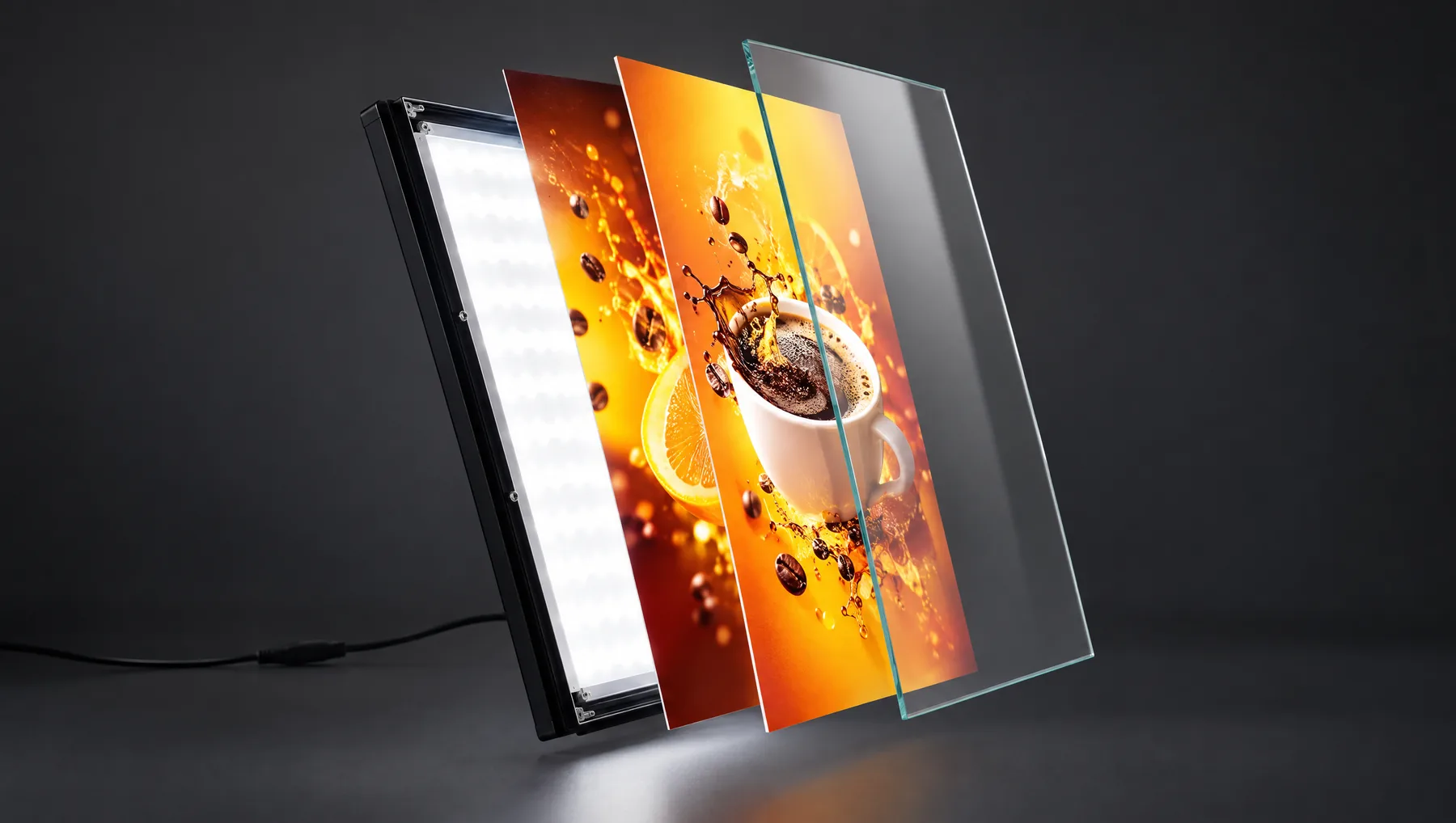
You can slide almost any thin material into an LEDMESEE frame, but not all of them look good when backlit. We explain why we print on backlit film and what happens when you put in ordinary paper.
The short answer
Backlit film gives the best result — it’s a material made to be lit from behind. You can also slide in other materials that fit in the slot and let light through, but ordinary paper looks noticeably worse once the backlight is on.
How we print at LEDMESEE
We make the prints for our frames ourselves, on profiled UV printers, on backlit film. We print using double CMYK technology: the print heads pass over every spot twice, so the ink layer is fuller than in standard printing.
As a result, colours stay saturated with the backlight on, and dark backgrounds don’t look washed out. We check your file free of charge before printing, and you get one free print with every frame (with several frames, the cart picks the better option: a free print or a volume discount).
Why ordinary paper looks pale
Paper is made to be viewed in reflected light, not transmitted light. When you light it from behind, the light shines through the thin ink layer and the colours fade: black turns grey and photos lose contrast.
- The paper’s texture shows: fibres and uneven density that make the poster look blotchy.
- Colours are pale and less saturated than in the design on screen.
- Thin paper can ripple and shift inside the frame.
- Thick paper or card lets little light through, so the poster is dark and unevenly lit.
What else you can slide into the frame
The print slot is more than 1 mm wide, so besides backlit film you can easily slide in a thicker material too — up to about 1 mm, as long as it lets light through.
- Backlit film — the best choice for backlighting.
- Other films and plastics for backlighting, e.g. translucent PP or PET.
- Thin, opal plastic sheets up to about 1 mm, when the poster needs to be rigid.
- Don’t insert materials that block light or are thicker than the slot — never force anything in.
Print file: the key rules
You’ll find the exact print sizes for each frame in the technical specifications, and more about the design in our guide to preparing your file.
- File dimensions = print size from the table, at 1:1 scale (for example, A4 is 210 × 297 mm).
- Resolution: 300 dpi at 1:1 scale — the higher the resolution, the better the print quality.
- Colours: prepare your file in CMYK. If you send a file in RGB, our printer’s profile will convert it to CMYK automatically.
- Keep important text, prices and logos at least 10 mm from the edge — the poster edges sit under the frame profile.
The simplest route: a frame with a print
Order the frame together with a backlit print in the exact size — you send the file after ordering, and we check it before printing. If you print elsewhere, ask the print shop for backlit film made for illumination, and check one print in the frame before a larger run.
Frame finder
Not sure which frame to choose?
Answer 4 short questions — we will suggest the model, size and accessories, and you can add the complete set to your cart in one click.
Find your frame in 30 sYOUR VENUE. YOUR DESIGN.
Show us your location.
An interior photograph and brief offer description are enough to start. We will help choose the model, format and print for what the customer should see.
FOR ADVERTISING AGENCIES
Sell frames and earn on every poster change.
Join the LEDMESEE partner programme: attractive agency pricing and 30% off to start. We are looking for partners worldwide.